How an Attack Actually Unfolds
Trace the common stages of an attack and identify the specific points where the right control stops the chain.
Presenting to others?
View this module as full-screen slides for meetings, classes, or group presentations.
Module 2 of 7
0 of 7 complete0%
An attack is a chain, not an event
How an attack unfolds
An attack is a chain, not a single event.
Compromises rarely happen in one dramatic moment — they progress through stages. A chain can be broken at any link: you do not need to stop every stage, just reliably stop at least one and detect the rest.
02
The five stages of a compromise
- 01
Entry
A convincing email or an exposed service gives the attacker a first foothold.
- 02
Credential theft
The attacker captures a password, often through a fake login page.
- 03
Quiet expansion
With valid credentials, the attacker quietly explores email, files, and connected systems.
- 04
Preparation
Backups are located, security tools are disabled, and valuable data is copied.
- 05
Impact
Files are encrypted, funds are redirected, or data is published.
Learn more: what happens inside each stageLearn more
Entry can also come from a malicious attachment or a compromised website, not just email. In credential theft, the fake login page often looks exactly like the real one. Quiet expansion can last weeks with few obvious symptoms — and often the group that breaks in sells that access to another that carries out the damage, which is why a quiet intrusion with no immediate impact still matters. Impact is usually the first stage an organization actually notices.
Learn more: why the backups are attacked firstLearn more
Attackers understand that a business with working backups does not need to negotiate. Locating and corrupting backups before triggering encryption is a standard step, which is why backup isolation and integrity verification matter as much as backup itself.
03
Why capable people still get caught
Modern phishing does not look like fraud — it looks like work.
Anatomy of a convincing phishing request
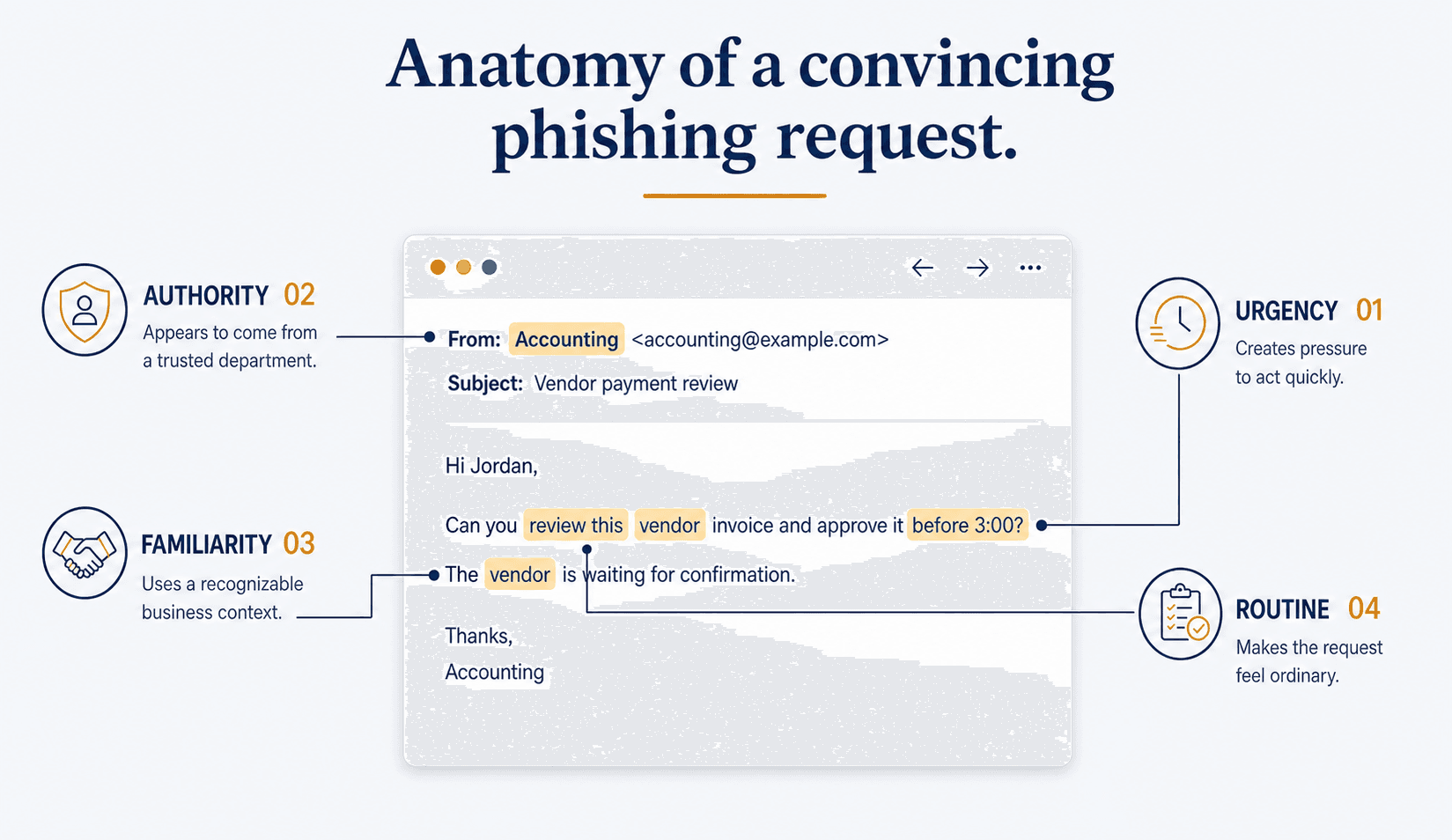
From: Accounting <accounting@example.com>
Subject: Vendor payment review
Hi Jordan,
Can you review this vendor invoice and approve it before 3:00?
The vendor is waiting for confirmation.
Thanks,
Accounting
Authority 02
Appears to come from a trusted department.
References: “Accounting”
Routine 04
Makes the request feel ordinary.
References: “review this”
Familiarity 03
Uses a recognizable business context.
References: “vendor”
Urgency 01
Creates pressure to act quickly.
References: “before 3:00?”
Awareness reduces clicks. It never eliminates them.
Training helps, but security systems must assume someone will eventually click.
Did you know?
A single convincing email is still the most common entry point for a business compromise — which is why no amount of caution replaces the controls behind it.
The blind spot
The blind spot
You will notice the final stage first — unless something is watching the quiet ones.
05
Interrupting the chain in practice
Attackers move through stages. The right controls at each link stop them cold—and keep them from reaching the next.
Controls that break the chain at different links
Threat
1. Secure DNS & web filtering
2. Multi-factor authentication
3. Endpoint detection & response
4. Monitoring with professional oversight
Attack contained
Threat
1. Secure DNS & web filtering
2. Multi-factor authentication
3. Endpoint detection & response
4. Monitoring with professional oversight
Attack contained
Layered controls. Multiple stops. One goal.
No single control is perfect, but together they break the attack chain.
Each break in the chain gives us another opportunity to stop the attacker.
The same attack, with and without layered controls
Malicious link clicked
Unprotected environment
Fake login page loads normally.
Layered environment
Secure DNS filtering blocks the known-malicious destination before it loads.
Password captured
Unprotected environment
Credentials immediately work from anywhere.
Layered environment
Multi-factor authentication stops the login without the second factor.
Malware executed
Unprotected environment
Runs undetected on the endpoint.
Layered environment
Endpoint detection identifies the behavior and isolates the device.
Attacker explores quietly
Unprotected environment
No one is watching for unusual activity.
Layered environment
Monitoring surfaces the anomaly for professional review.
Files encrypted
Unprotected environment
Recovery depends on paying a ransom.
Layered environment
Verified, isolated backups restore operations without negotiating.
Every layer adds another chance to detect an attacker — and every layer an attacker has to defeat buys you time to respond.
These controls each break the chain at a different point. Module 3 explains why they work best as coordinated layers, so that when one fails another still blocks, detects, or limits the attack.
What to remember
Four ideas worth carrying forward
- An attack is a chain of stages — entry, credential theft, expansion, preparation, and impact.
- Most organizations first notice the final stage, long after entry occurred.
- Attackers deliberately target backups before triggering encryption.
- Layered controls force an attacker to defeat several independent defenses, and each layer adds a chance to detect them.
Terms used in this module
Select a term to read its definition without leaving this page.
Finished this module?
Mark it complete to save your progress, or continue without marking it complete.